Leaderboards
Adding leaderboards to your game is perfect to allow players to compete. It's also a way to increase the retention of players, displaying the scores of the best ones.
GDevelop provides a built-in solution to create, manage and use leaderboards in your game. These leaderboards can be created for any game, are fast and efficient and can scale from small games to millions of players as they are based on our adaptable, elastic infrastructure.
Note
You can either submit scores from anonymous players (with a nickname) or for connected players. We recommend sending scores for connected players, as this will allow them later to benefit from new features (like achievements).
Manage leaderboards
In the games dashboard, you can access all the leaderboards linked to your game. To find more details on how to manage and configure leaderboards, please refer to leaderboard administration.
You can also access this administration interface from within the actions and conditions related to leaderboards.
Send a new score to a leaderboard
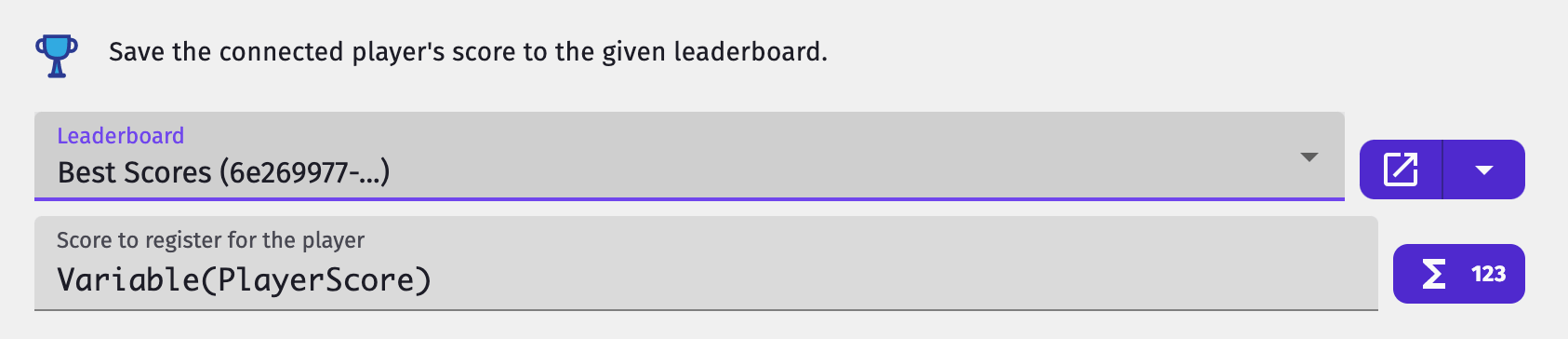
Use the action "Save connected player score" (or "Save player score" if the player is not connected) to submit the score of a player:

- If you haven't created a leaderboard yet, do so in the Leaderboard administration interface.
- Once it is done, you can either select the leaderboard you want to send the score to, or use an expression to define the unique id of the leaderboard (if it is stored in a scene variable for instance).
- Finally, set the score to send. A number field is available for this: you probably want to use a
Variableexpression to read the value of a variable in memory.
Check that the score was correctly saved
You can monitor the result of a save action using the conditions "Score is saving", "Last score save has succeeded" and "Last score save has errored". If something goes wrong, the "Error of last save attempt" expression returns the underlying error code (for example "TOO_FAST", "SAME_AS_PREVIOUS", "GLOBAL_RATE_LIMIT_EXCEEDED", or "LEADERBOARD_RATE_LIMIT_EXCEEDED") so you can react accordingly (for example, show a "score not saved" message).
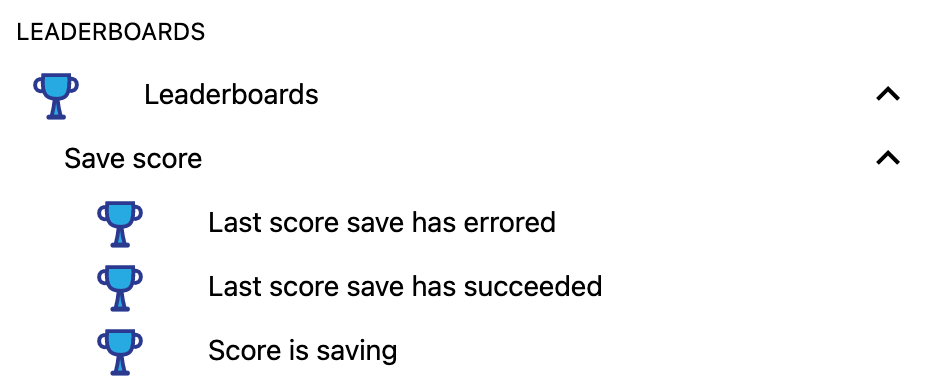
For each of those conditions, you can specify the leaderboard but this is optional. This can prove useful if you try to save the player score in multiple leaderboards at once.
Note
To prevent abuse, GDevelop automatically ignores save attempts that are submitted too quickly (within 500ms of each other), submit the same score and player as the previous save, or exceed reasonable rate limits across leaderboards. Trigger the save action only at the right gameplay moments (end of level, game over, new personal best) rather than every frame.
Attach scores to the connected player
When the player is logged in, scores sent with "Save player score" are automatically attached to their account. You can disable this with the action "Always attach scores to the connected player" — for example, to let a logged-in player submit a custom anonymous nickname instead of their account name.
Display a leaderboard
Use the action "Display leaderboard" to load and display a leaderboard on the screen. It will be displayed on top of your game, and the view will have a button to close it in order to come back to your game.
Tip
Leaderboards can be displayed on any platform: Android, iOS, desktop, on the web. They will work everywhere and will adapt to the screen size.

While it's loading, to let the player know that the leaderboard will display soon, you have the choice between 2 options:
- Display the built-in loader (using the option available in the action)
- Use the condition "Leaderboard display is loading" to trigger an action (display a text "Loading" for example)
Either case, if there's an error during the display, it will close automatically. You can also use the 2 conditions "Leaderboard display has errored" and "Leaderboard display has loaded" if you want to add logic around a possible error.
Close the leaderboard
The leaderboard view comes with its own close button, but you can also close it from events with the action "Close current leaderboard" — useful, for example, to dismiss it when the player presses a key or after a timeout.
To run logic after the player dismissed the view (for example, to resume gameplay or change scene), use the condition "Closed by player". It is true for one frame, on the frame the leaderboard view was closed.
Advanced: pause the scene when the leaderboard is displayed
We recommend that you send back the player to a menu scene or a non gameplay scene after you open the leaderboard.
Tip
In this case, don't forget to activate the option to display the leaderboard loader, so that your players wait until the leaderboard is loaded and are not confused.
In some games, you may want to pause the scene while the leaderboard is displayed. For this, you can use an intermediate scene:
- Suppose you have a scene that is named "Level 1"
- Create a new scene "LeaderboardBackground"
- This scene will run in background when the leaderboard is displayed
- In the events sheet of scene "Level 1", add this event:

- In the events sheet of scene "LeaderboardBackground", add this event to go back to "Level 1" scene:

Advanced: Set the name of the player for anonymous players
For the player to type their name, you can use the Text Input or Text Entry objects and then use the result to set the player name in the entry that will be sent to the leaderboard.
Note
Note that in most cases, it's simpler to just ask your player to log in to your game. Their username will be handled by GDevelop directly.
The player name must respect a few constraints (30 characters-long, allowed characters are letters from the latin alphabet or numbers and the characters -, _ and |).
To help you respect those constraints, the action will apply the expression Leaderboards::FormatPlayerName to the provided player name. Here is a few examples on how this expression can transform the player name:
| Original player name | Formatted | Why |
|---|---|---|
"Dr Neo Cortex-24|7" |
"Dr_Neo_Cortex-24|7" |
White spaces replaced by _ |
"Senna$!" |
"Senna" |
Special characters removed |
"Brûlé" |
"Brule" |
Diacritic marks removed |
"aPlayerNameTh4tIsT00LongToBeSaved" |
"aPlayerNameTh4tIsT00LongToBeSa" |
Name truncated if too long |
"" (empty) |
"Player89456" |
Random name if input is empty (5-digits-long number) |
Reference
All actions, conditions and expressions are listed in the leaderboards reference page.